GCP-DisableServiceAccountFromTeams
Browse: 🏠 · Solutions · Connectors · Methods · Tables · Content · Parsers · ASIM Parsers · ASIM Products · 📊
When a new sentinel incident is created, this playbook gets triggered and performs the following actions: 1. Sends an adaptive card to the Teams channel where the analyst can choose an action to be taken. 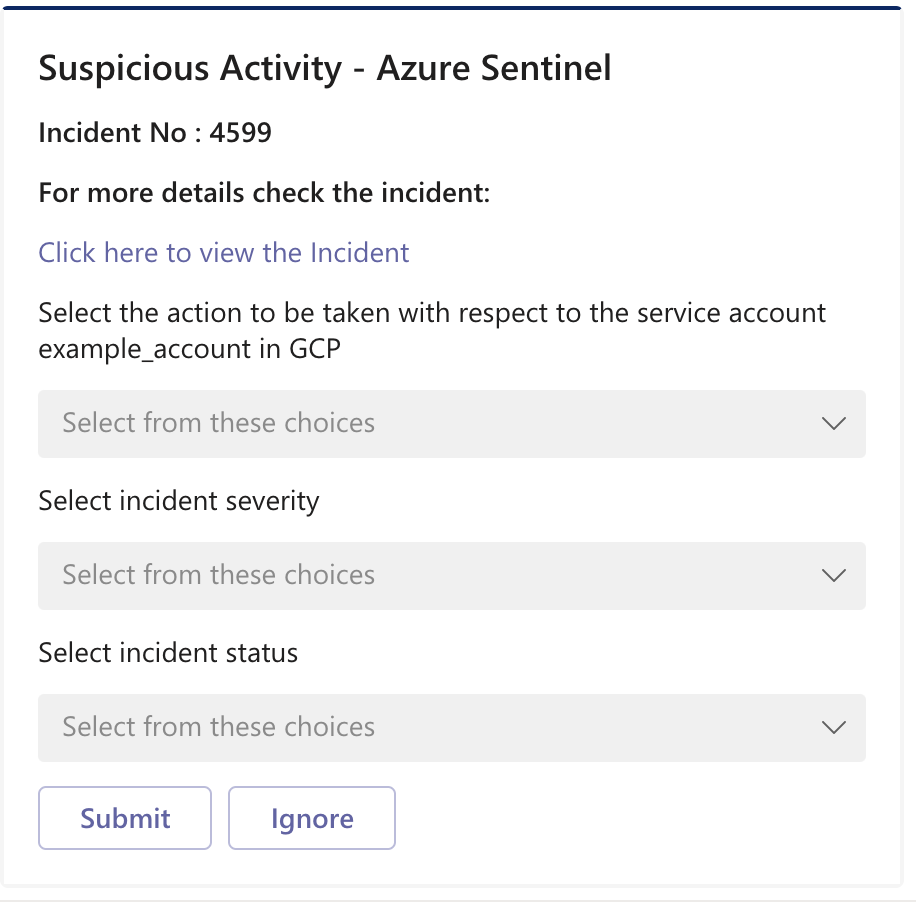 2. Disables Service Account depen
| Attribute | Value |
|---|---|
| Type | Playbook |
| Solution | GoogleCloudPlatformIAM |
| Source | View on GitHub |
Additional Documentation
Summary
When a new sentinel incident is created, this playbook gets triggered and performs the following actions:
- Sends an adaptive card to the Teams channel where the analyst can choose an action to be taken.

- Disables Service Account depending on the action chosen in the adaptive card.
- Changes incident status and severity depending on the action chosen in the adaptive card.
- Adds comment to the incident with information about the actions taken.

Prerequisites
- Prior to the deployment of this playbook, GoogleCloudPlatformIAM Connector needs to be deployed under the same subscription.
- GCP credentials are required. Refer to the GoogleCloudPlatformIAM Custom Connector documentation.
Deployment instructions
- To deploy the Playbook, click the Deploy to Azure button. This will launch the ARM Template deployment wizard.
- Fill in the required paramteres:
- Playbook Name: Enter the playbook name here
- Teams Group Id: Id of the Teams Group where the adaptive card will be posted
- Teams Channel Id: Id of the Teams Channel where the adaptive card will be posted
Post-Deployment instructions
a. Authorize connections
Once deployment is complete, authorize each connection.
- Click the Microsoft Sentinel connection resource
- Click edit API connection
- Click Authorize
- Sign in
- Click Save
- Repeat steps for other connections
b. Configurations in Sentinel
- In Microsoft sentinel, analytical rules should be configured to trigger an incident. An incident should have the gcp_project_id and gcp_service_account custom entities. Check the documentation to learn more about adding custom entities to incidents.
- Configure the automation rules to trigger the playbook.
Browse: 🏠 · Solutions · Connectors · Methods · Tables · Content · Parsers · ASIM Parsers · ASIM Products · 📊